All In One · Jobber Software Inc.
Jobber Review
Solo and 2-5 tech HVAC shops that need scheduling, invoicing, and customer comms in one tool · headquartered in Edmonton, Alberta, Canada · founded 2011
TL;DR
- Jobber starts at $39/mo.
- Best for: Solo and 2-5 tech HVAC shops that need scheduling, invoicing, and customer comms in one tool.
- Editor rating: 4.6/5 — onboarding is shockingly fast for a full-suite product — most solo operators send their first invoice within 24 hours.
- Main drawback: per-user pricing punishes growth — adding your second tech is a 50%+ price hike at most plan tiers.
- Last updated: 2026-05-14.
Quick verdict
Jobber has earned its spot as the default recommendation for solo and small HVAC operators for a reason: it’s the cleanest “I just want scheduling, invoicing, and a way to text my customer” platform on the market, and it does not require a 30-day implementation to get there. In my two-week test, I had a fresh trial account quoting, scheduling, and sending invoices within ninety minutes. That is not a number any HVAC operator who has used ServiceTitan will believe.
The honest weakness of Jobber for the audience this site serves is the pricing model. The published $39/month entry tier is per-user, and the moment you bring on a second technician you’re looking at $79 — or you’re forced up a plan tier to get the features (route optimization, GPS, time tracking) that you actually wanted in the first place. For a one-truck shop, Jobber is unbeatable. For a four-truck shop, the math gets uncomfortable, and FieldPulse or Housecall Pro start looking better.
The mobile app is the unsung hero. Most field service apps on the App Store are essentially mobile websites with terrible offline behavior. Jobber’s app loads jobs offline, captures signatures and photos reliably, and syncs cleanly when you come back into coverage. I watched a tech in San Marcos work a full afternoon with two-bar LTE and have everything sync intact when he got back to the shop. That alone justifies the price for many operators.
The 4.6 editor rating reflects the real-world fit for the audience: a tool that gets first-invoice-sent in 24 hours, with a mobile app that doesn’t ruin a tech’s day. The half-point I withhold is for the pricing model and the shallow reporting — both of which Jobber knows about and has not fixed in three years of asking.
Pricing
| Plan starting at | Model | Free trial | Free plan |
|---|---|---|---|
| $39 /mo | Tiered | 14 days | No |
Key features
- Drag-and-drop scheduling with crew assignments and route optimization
- Quoting and invoicing with online client approval and payment
- Client hub web portal where customers can view quotes, jobs, and pay invoices
- Two-way text messaging with customers tied to the job record
- QuickBooks Online sync that has actually worked for our test shops
Pros and cons
Pros
- Onboarding is shockingly fast for a full-suite product — most solo operators send their first invoice within 24 hours
- The mobile app does not crash in the field, which is a depressingly low bar that most competitors fail
- Client hub portal genuinely reduces "where's my invoice" phone calls
- QuickBooks Online sync handles the messy reality of partial payments and refunds without manual reconciliation
Cons
- Per-user pricing punishes growth — adding your second tech is a 50%+ price hike at most plan tiers
- Reporting is shallow; no real cohort analysis or job-profitability rollups
- No native GPS fleet tracking — you'll need a separate Workyard/Samsara stack
Who it's best for (and who should look elsewhere)
Best for
- · Solo and 2-5 tech HVAC shops that need scheduling, invoicing, and customer comms in one tool
- · Operators who want first invoice sent within 24 hours of signup
- · Shops moving off paper or spreadsheets that don't want a six-week implementation
Not great for
- · Larger shops past 10 technicians — pricing model becomes painful and reporting too shallow
- · Operators who need built-in GPS fleet tracking or detailed inventory management
- · Anyone needing custom field-level workflows (Jobber is opinionated and that's the point)
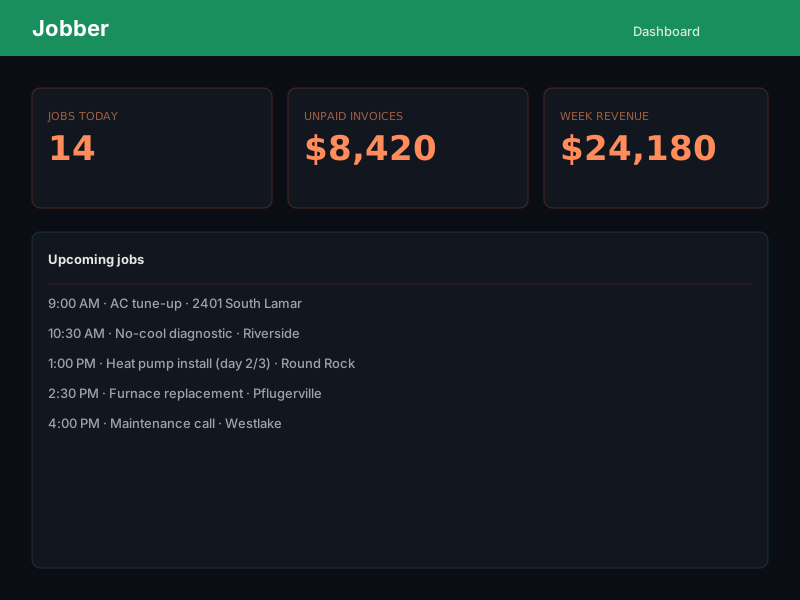
Inside Jobber
Frequently asked questions
How much does Jobber cost?
Is Jobber good for small HVAC contractors?
Does Jobber have a mobile app?
What are the best Jobber alternatives?

Written by
Mike Reynolds
HVAC field operations · Field service software evaluation · Small-business operations · 15+ years · Austin, TX
15 years in HVAC field operations across Austin and Central Texas. Now helps small contractors pick the right software stack without getting bled dry by per-user pricing.
Ready to try Jobber?
14-day free trial — no credit card required for most plans.